
374 lines
9.4 KiB
Markdown
374 lines
9.4 KiB
Markdown
# telescope.nvim
|
|
|
|
Gaze deeply into unknown regions using the power of the moon.
|
|
|
|
## What is Telescope?
|
|
|
|
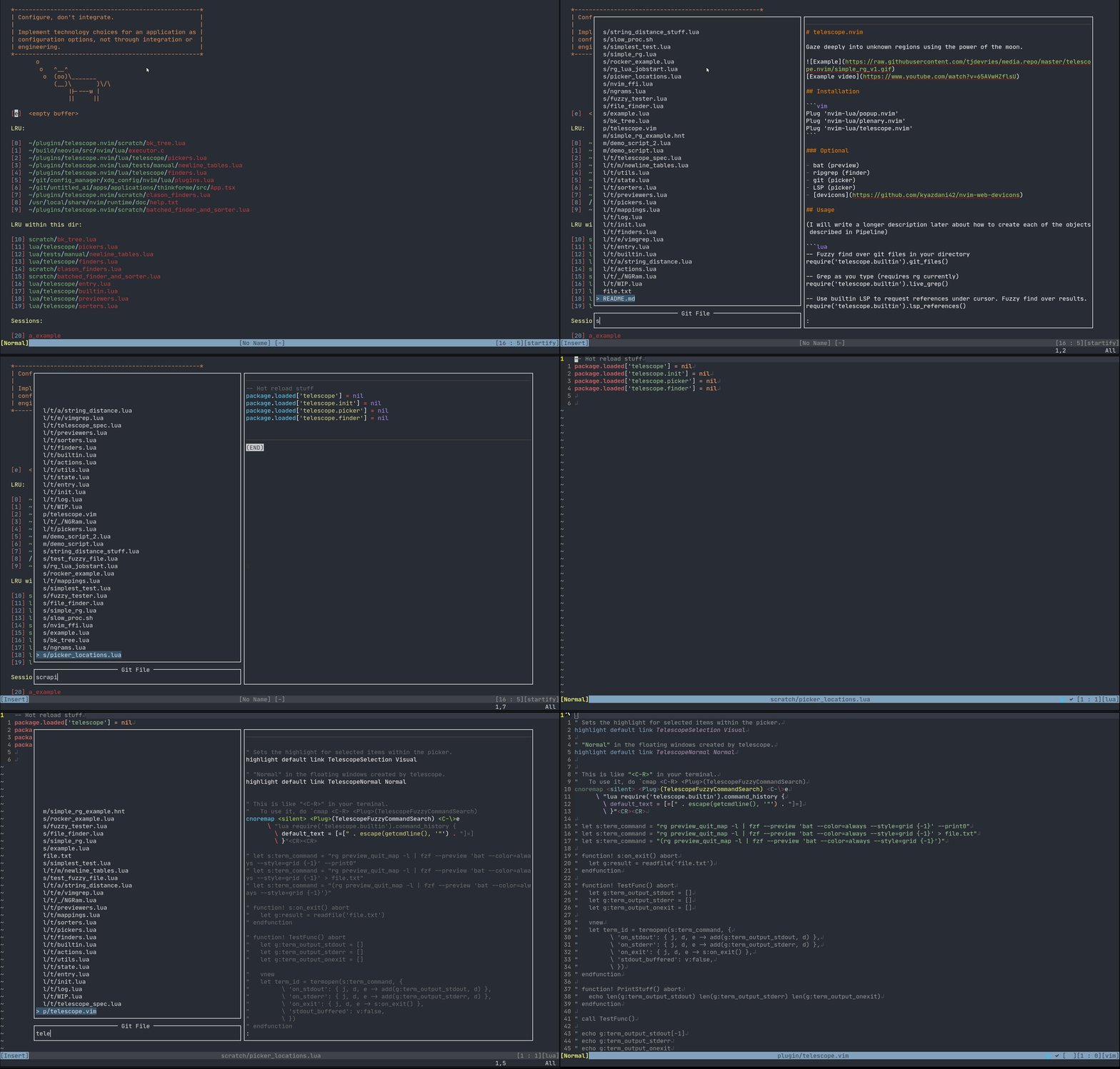
Telescope is a highly extendable fuzzy finder over lists. Items are shown in a popup with a prompt to search over.
|
|
|
|
Support for:
|
|
|
|
* LSP (references, document symbols, workspace symbols)
|
|
* Treesitter
|
|
* Grep
|
|
* Files (git, fd, rg)
|
|
* Vim (command history, quickfix, loclist)
|
|
|
|
[What is Telescope?](https://www.twitch.tv/teej_dv/clip/RichDistinctPlumberPastaThat)
|
|
|
|
|
|
|
|
|
|
[Example video](https://www.youtube.com/watch?v=65AVwHZflsU)
|
|
|
|
## Requirements
|
|
|
|
Neovim Nightly (0.5)
|
|
|
|
Best experience on Neovim Nightly with LSP configured.
|
|
|
|
## Installation
|
|
|
|
```vim
|
|
Plug 'nvim-lua/popup.nvim'
|
|
Plug 'nvim-lua/plenary.nvim'
|
|
Plug 'nvim-lua/telescope.nvim'
|
|
```
|
|
|
|
### Optional
|
|
|
|
- [bat](https://github.com/sharkdp/bat) (preview)
|
|
- [ripgrep](https://github.com/BurntSushi/ripgrep) (finder)
|
|
- Treesitter ([nvim-treesitter](https://github.com/nvim-treesitter/nvim-treesitter)) (finder/preview)
|
|
- fd ([sharkdp/fd](https://github.com/sharkdp/fd)) (finder)
|
|
- git (picker)
|
|
- [neovim LSP]( https://neovim.io/doc/user/lsp.html) (picker)
|
|
- [devicons](https://github.com/kyazdani42/nvim-web-devicons)
|
|
|
|
## Usage
|
|
|
|
Most actions are activated via keybinds. Attach these functions as described more in the [Examples](#Examples)
|
|
|
|
```lua
|
|
-- Fuzzy find over git files in your directory
|
|
require('telescope.builtin').git_files()
|
|
|
|
-- Grep files as you type (requires rg currently)
|
|
require('telescope.builtin').live_grep()
|
|
|
|
-- Use builtin LSP to request references under cursor. Fuzzy find over results.
|
|
require('telescope.builtin').lsp_references()
|
|
|
|
-- Convert currently quickfixlist to telescope
|
|
require('telescope.builtin').quickfix()
|
|
|
|
-- Convert currently loclist to telescope
|
|
require('telescope.builtin').loclist()
|
|
```
|
|
|
|
Options can be passed directly to the above functions, or set as defaults.
|
|
|
|
```lua
|
|
-- Optional way to setup default values
|
|
require('telescope').setup{
|
|
default = {
|
|
-- Example:
|
|
shorten_path = true -- currently the default value is true
|
|
}
|
|
}
|
|
```
|
|
|
|
## Examples
|
|
|
|
```vim
|
|
nnoremap <Leader>p <cmd>lua require'telescope.builtin'.git_files{}<CR>
|
|
```
|
|
|
|
Searches over files in a git folder. Note: This does not work outside a git repo folder.
|
|
|
|
```vim
|
|
nnoremap <Leader>p <cmd>lua require'telescope.builtin'.find_files{}<CR>
|
|
```
|
|
|
|
Search over files in your `cwd` current working directory.
|
|
|
|
```vim
|
|
nnoremap <silent> gr <cmd>lua require'telescope.builtin'.lsp_references{}<CR>
|
|
```
|
|
|
|
Search over variable references from your Language Server.
|
|
|
|
```vim
|
|
nnoremap <Leader>en <cmd>lua require'telescope.builtin'.find_files{ cwd = "~/.config/nvim/" }<CR>
|
|
```
|
|
|
|
Find all the files in your nvim config.
|
|
|
|
### Full Example
|
|
|
|
```vim
|
|
lua <<EOF
|
|
-- totally optional to use setup
|
|
require('telescope').setup{
|
|
default = {
|
|
shorten_path = false -- currently the default value is true
|
|
}
|
|
}
|
|
EOF
|
|
|
|
nnoremap <c-p> :lua require'telescope.builtin'.find_files{}<CR>
|
|
nnoremap <silent> gr <cmd>lua require'telescope.builtin'.lsp_references{ shorten_path = true }<CR>
|
|
```
|
|
|
|
What this does:
|
|
|
|
* Make the paths full size by default. On LSP references we are shortening paths.
|
|
* Bind `<ctrl-p>` for a common mapping to find files.
|
|
- Using `telescope.builtin.git_files` is better in git directories. You can make a toggle to detect if it's a git directory.
|
|
* Bind `gr` to find references in LSP.
|
|
- `telescope.builtin.lsp_workspace_symbols` and `telescope.builtin.lsp_document_symbols` are also good to bind for LSP.
|
|
|
|
## Mappings
|
|
|
|
Mappings are fully customizable. Many familiar mapping patterns are setup as defaults.
|
|
|
|
```
|
|
<C-n> <C-p> next | previous
|
|
<Down> <Up> next | previous
|
|
j k next | previous (in normal mode)
|
|
<CR> go to file selection
|
|
|
|
<C-x> go to file selection as a split
|
|
<C-v> go to file selection as a vertical split
|
|
<C-t> go to a file in a new tab
|
|
|
|
<C-u> scroll up in preview window
|
|
<C-d> scroll down in preview window
|
|
|
|
<C-c> close telescope
|
|
<Esc> close telescope (in normal mode)
|
|
```
|
|
|
|
Attaching your own mappings is possible and additional information will come soon.
|
|
|
|
Additionally, the prompt's filetype will be `TelescopePrompt`. You can customize the filetype as you would normally.
|
|
|
|
## Status (Unstable API)
|
|
|
|
While the underlying API & Infrastructure (A.K.A. Spaghetti Code) is still very much WIP and
|
|
will probably change quite a bit, the functions in `builtin` should be relatively stable (as
|
|
in, you can report bugs if they don't work, you should be able to keep them around in your config
|
|
even if everything inside of those functions is rewritten. They provide pretty simple, easy to use
|
|
wrappers over common tasks).
|
|
|
|
## API
|
|
|
|
### `builtin`
|
|
|
|
```lua
|
|
require'telescope.builtin'.builtin{
|
|
-- Optional
|
|
-- hide_filename = true
|
|
-- ignore_filename = true
|
|
}
|
|
```
|
|
|
|
Handy documentation, showcase of all tools available in Telescope.
|
|
|
|
#### Files
|
|
|
|
```lua
|
|
require'telescope.builtin'.git_files{}
|
|
```
|
|
|
|
Search your files in a git repo. Ignores files in your .gitignore. You can optionally override the find command.
|
|
|
|
Note: Requires the `cwd` to be a git directory.
|
|
|
|
```lua
|
|
require'telescope.builtin'.find_files{
|
|
-- Optional
|
|
-- cwd = "/home/tj/"
|
|
-- find_command = { "rg", "-i", "--hidden", "--files", "-g", "!.git" }
|
|
}
|
|
```
|
|
Searches files in your working directory.
|
|
|
|
```lua
|
|
require'telescope.builtin'.grep_string{
|
|
-- Optional
|
|
-- search = false -- Search term or <cword>
|
|
}
|
|
```
|
|
|
|
Searches your string with a grep.
|
|
Note: Requires `rg`.
|
|
|
|
```lua
|
|
require'telescope.builtin'.live_grep{}
|
|
```
|
|
|
|
Searches all your files (respecting .gitignore) using grep.
|
|
Note: Requires `rg`
|
|
|
|
#### Vim
|
|
|
|
```lua
|
|
require'telescope.builtin'.oldfiles{}
|
|
```
|
|
|
|
Searches the vim oldfiles. See `:help v:oldfiles`
|
|
|
|
```lua
|
|
require'telescope.builtin'.quickfix{}
|
|
```
|
|
|
|
Search on the quickfix. See `:help quickfix`
|
|
|
|
```lua
|
|
require'telescope.builtin'.loclist{}
|
|
```
|
|
|
|
Search on the current window's location list.
|
|
|
|
```lua
|
|
require'telescope.builtin'.command_history{}
|
|
```
|
|
|
|
Search the vim command history.
|
|
|
|
```lua
|
|
require'telescope.builtin'.buffers{
|
|
-- Optional
|
|
-- show_all_buffers = true -- Show unloaded buffers aswell
|
|
}
|
|
```
|
|
|
|
Search on vim buffers list.
|
|
|
|
#### LSP
|
|
|
|
```lua
|
|
require'telescope.builtin'.lsp_references{}
|
|
```
|
|
|
|
Search on LSP references.
|
|
|
|
```lua
|
|
require'telescope.builtin'.lsp_document_symbols{}
|
|
```
|
|
|
|
Search on LSP Document Symbols in the current document.
|
|
|
|
```lua
|
|
require'telescope.builtin'.lsp_workspace_symbols{}
|
|
```
|
|
|
|
Search on all workspace symbols.
|
|
|
|
#### Treesitter
|
|
|
|
```lua
|
|
require'telescope.builtin'.treesitter{
|
|
-- Optional
|
|
-- bufnr = Buffer number
|
|
}
|
|
```
|
|
|
|
Search on function names, variables, from Treesitter!
|
|
|
|
Note: Requires nvim-treesitter
|
|
#### Telescope
|
|
|
|
```lua
|
|
require'telescope.builtin'.planets{}
|
|
```
|
|
|
|
Use the telescope.
|
|
|
|
## Themes
|
|
|
|
Common groups of settings can be setup to allow for themes. We have some built in themes but are looking for more cool options.
|
|
|
|
```vim
|
|
nnoremap <Leader>f :lua require'telescope.builtin'.find_files(require('telescope.themes').get_dropdown({}))<cr>
|
|
```
|
|
|
|
Then you can put your configuration into `get_dropdown({})`
|
|
|
|
```vim
|
|
nnoremap <Leader>f :lua require'telescope.builtin'.find_files(require('telescope.themes').get_dropdown({ winblend = 10 }))<cr>
|
|
```
|
|
|
|
If you wish to make theme, check out `lua/telescope/themes.lua`. If you need more features, make an issue :).
|
|
|
|
## Goals
|
|
|
|
### Pipeline Different Objects
|
|
|
|
(Please note, this section is still in progress)
|
|
|
|
"finder":
|
|
|
|
- executable: rg, git ls-files, ...
|
|
- things in lua already
|
|
- vim things
|
|
|
|
```lua
|
|
-- lua/telescope/finders.lua
|
|
Finder:new{
|
|
entry_maker = function(line) end,
|
|
fn_command = function() { command = "", args = { "ls-files" } } end,
|
|
static = false,
|
|
maximum_results = false
|
|
}
|
|
```
|
|
|
|
`Sorter`:
|
|
- A `Sorter` is called by the `Picker` on each item returned by the `Finder`.
|
|
- `Sorter`s return a number, which is equivalent to the "distance" between the current `prompt` and the `entry` returned by a `finder`.
|
|
- Currently, it's not possible to delay calling the `Sorter` until the end of the execution, it is called on each item as we receive them.
|
|
- This was done this way so that long running / expensive searches can be instantly searchable and we don't have to wait til it completes for things to start being worked on.
|
|
- However, this prevents using some tools, like FZF easily.
|
|
- In the future, I'll probably add a mode where you can delay the sorting til the end, so you can use more traditional sorting tools.
|
|
|
|
"picker":
|
|
|
|
- fzf
|
|
- sk
|
|
- does this always need to be fuzzy?
|
|
- you'll map what you want to do with vimscript / lua mappings
|
|
|
|
Defaults:
|
|
|
|
### Picker
|
|
|
|
```lua
|
|
-- lua/telescope/pickers.lua
|
|
Picker:new{
|
|
prompt = "", -- REQUIRED
|
|
finder = FUNCTION, -- see lua/telescope/finder.lua
|
|
sorter = FUNCTION, -- see lua/telescope/sorter.lua
|
|
previewer = FUNCTION, -- see lua/telescope/previewer.lua
|
|
selection_strategy = "reset", -- follow, reset, line
|
|
border = {},
|
|
borderchars = {"─", "│", "─", "│", "┌", "┐", "┘", "└"},
|
|
preview_cutoff = 120,
|
|
}
|
|
```
|
|
|
|
"previewer":
|
|
|
|
- sometimes built-in
|
|
- sometimes a lua callback
|
|
|
|
As an example, you could pipe your inputs into fzf, and then it can sort them for you.
|
|
|
|
|
|
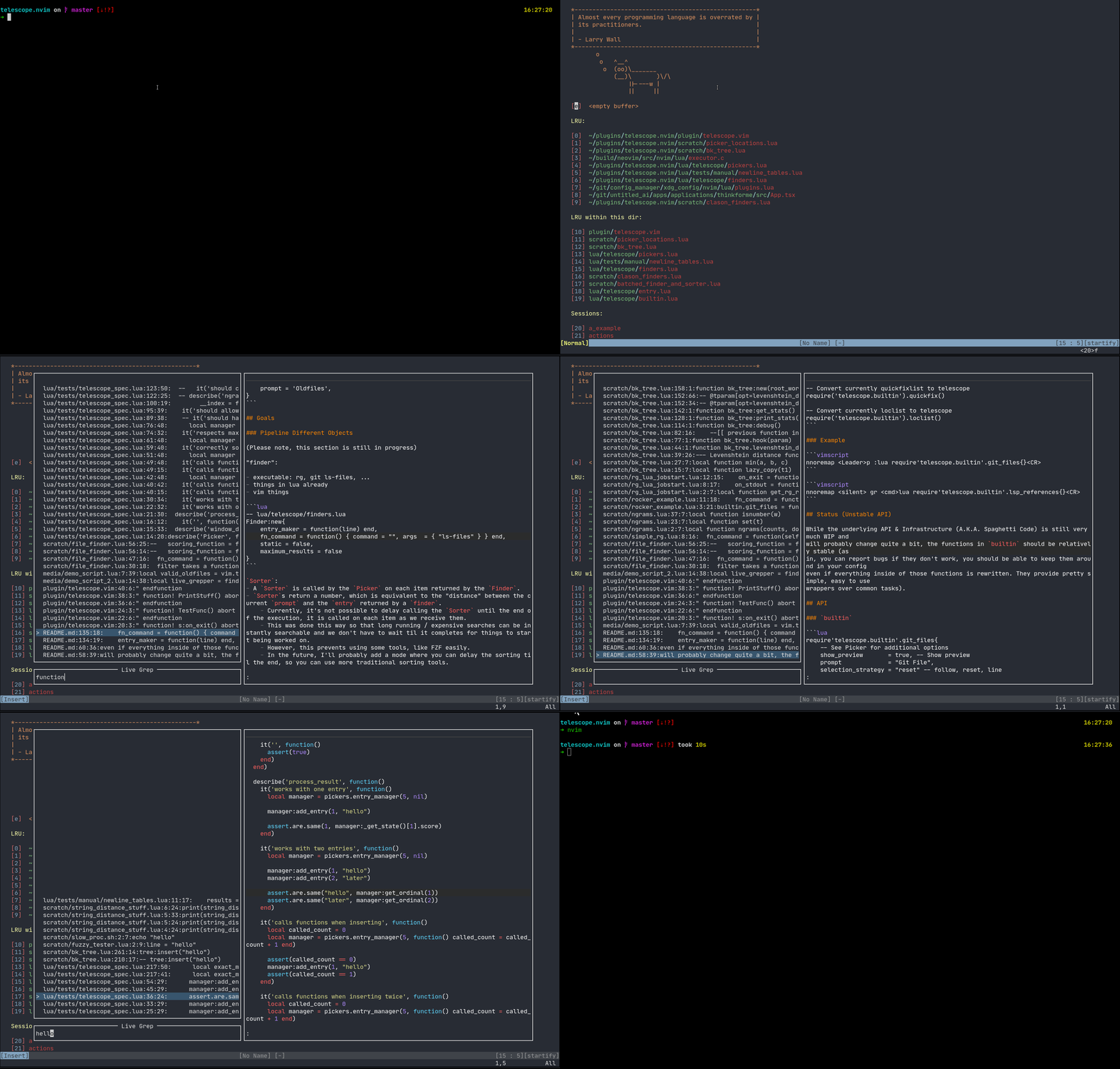
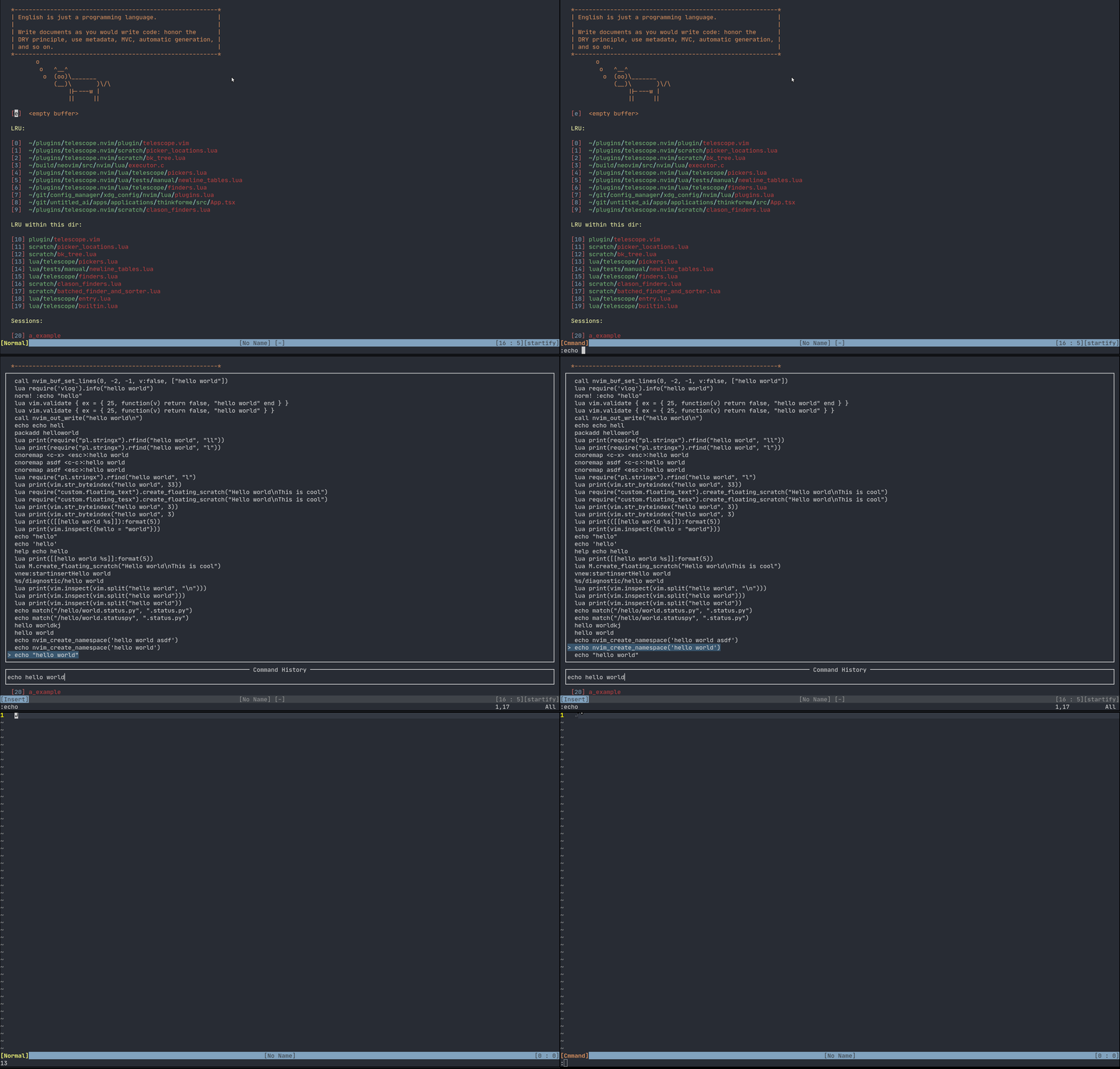
## Other Examples
|
|
|
|
|
|
|
|
|
|
|